Key takeaways
Complete WhatsApp Business API pricing breakdown: Marketing, Utility, and Authentication rates by country, plus free messaging windows and cost tips.
Ask an AI about this article
Quick Summary
WhatsApp Business API now charges per message delivered (not per conversation), with costs ranging from fractions of a cent to $0.20+ depending on message type and recipient country. Customer support replies are free for the first 1,000 a month per business phone number (since 1 October 2026), and Click-to-WhatsApp ad leads get up to 7 days of free messaging (since 28 September 2026). Smart businesses use platforms like Spur to see every message rate upfront while automating conversations with AI.
Why Is WhatsApp API Pricing So Confusing?
If you've tried to understand WhatsApp Business API costs recently, you've probably hit a wall of contradictory information. That's not your fault. Meta changed how WhatsApp API pricing works in mid-2025, and most guides still reference the old model.
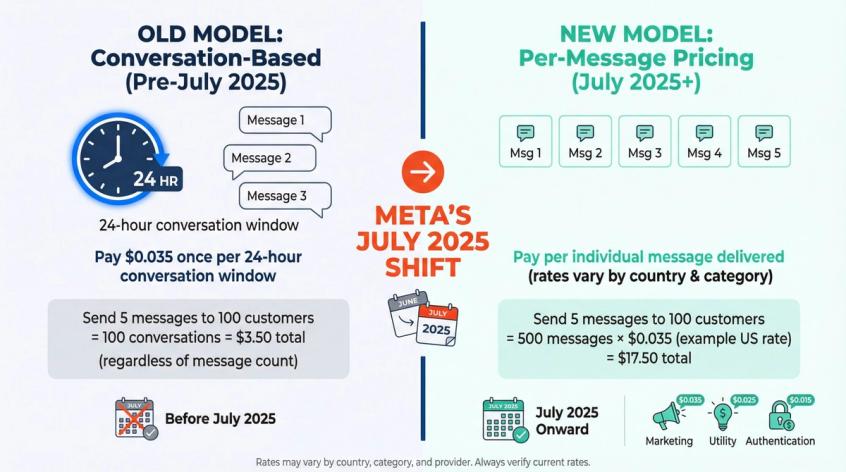
Here's what changed. The old system charged you per "conversation," defined as a 24-hour window of back-and-forth messaging. You'd pay once per conversation regardless of how many individual messages you sent. In July 2025, Meta switched to per-message pricing for business-initiated templates, making costs more granular and (ironically) more predictable once you understand the rules.
The problem? Many explanations still reference the old model, WhatsApp's own documentation mentions both systems in different places, and providers aren't always transparent about what they're charging on top of Meta's fees.
By the end of this guide, you'll know exactly what you'll pay for WhatsApp messaging, when you'll pay it, and how to optimize costs without sacrificing results. We'll cover the four message categories, explain the free messaging windows that most businesses underutilize, break down real country-by-country pricing, and show you how to calculate your actual monthly bill using tools like Spur's WhatsApp Pricing Calculator.
How Does WhatsApp API Pricing Work in 2026?
The core principle is straightforward: you pay Meta when a template message is successfully delivered to a user, and the cost depends on the message category and the recipient's country.
Let's break down what that actually means.
What costs money:
• Template messages you send outside of active conversations (marketing campaigns, abandoned cart reminders, shipping updates, OTP codes)
• These are pre-approved message formats that can reach customers who haven't contacted you recently
What's free:
• All messages from customers to you (100% free, unlimited)
• Your replies within 24 hours of a customer messaging you
• All messages (including templates) inside the free entry point window (up to 7 days) after someone contacts you through a Click-to-WhatsApp ad
The four factors that determine your bill:
1. Message category (Marketing, Utility, Authentication, or Service)
2. Recipient's country (determines the per-message rate)
3. Delivery status (you only pay if the message is delivered)
4. Your provider's fees (check how each prices messages; Spur's pricing lists every rate)
This model actually makes budgeting easier once you wrap your head around it. Instead of guessing how many "conversations" you'll have, you can calculate costs based on message volume and your audience's geographic distribution.
WhatsApp Message Types and Costs
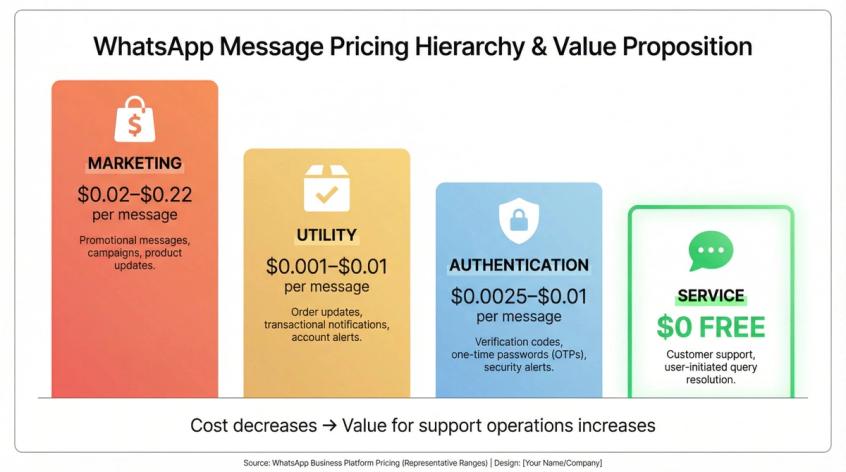
Every template message falls into one of four categories, and understanding these is critical for both pricing and compliance.
| Category | Purpose | Typical Cost Range | Key Notes |
|---|---|---|---|
| Marketing | Promotional messages (sales, product recommendations, newsletters) | $0.02–$0.22+ per message | Most expensive; some countries limit frequency |
| Utility | Transactional updates (order confirmations, shipping, appointments) | $0.001–$0.01 per message | 80% cheaper than marketing; charged even within service windows since 1 October 2026 |
| Authentication | One-time passwords, verification codes, 2FA | $0.0025–$0.01 per message | Lowest cost; charged even in service windows; volume discounts apply |
| Service | Free-form responses within customer conversations | Same as utility after 1,000 free a month per number | Charged since 1 October 2026; 24-hour windows reset with each customer message |
Marketing Messages
These are promotional messages you initiate with customers. Think sale announcements, product recommendations, newsletters, or abandoned cart recovery via WhatsApp. "Hey, you left items in your cart. Here's 10% off to complete your purchase" is a marketing message.
Marketing templates are the most expensive category because they're outbound promotion. Rates vary dramatically by country. A marketing message might cost $0.02 in India, $0.035 in the United States, or $0.20+ in Germany. If you're running large WhatsApp marketing campaigns, this category will be your biggest WhatsApp expense.
Important note: some countries have per-user limits on marketing messages (like one marketing template per 24 hours to the same person) to prevent spam.
Utility Messages
Utility templates handle transactional updates tied to a customer action. Order confirmations, shipping notifications via WhatsApp, appointment reminders, payment receipts. These are messages the customer expects or needs.
They're business-initiated but not promotional, so they cost significantly less than marketing messages. In the US, for example, utility messages run around $0.006 compared to $0.03-$0.04 for marketing. That's an 80% discount for transactional content.
Here's a change to plan for: until 30 September 2026, a utility template sent within an active 24-hour customer service window was free. Since 1 October 2026 it is charged at the utility rate, so a shipping update sent two hours after a customer asks "where's my order?" now costs one utility message.
Eligible accounts can now send utility messages without creating a template first, through WhatsApp Direct Send, and Meta charges them at the same utility rate.
Authentication Messages
This category covers one-time passwords, verification codes, and login/authentication flows. "Your code is 123456" messages live here.
Authentication templates have the lowest per-message cost of all categories. Meta wants businesses using WhatsApp for security and 2FA, so they price it aggressively. In many markets, auth messages cost under a penny. India is around $0.0025, many countries are under $0.01.
The catch: authentication templates are charged even within a 24-hour customer service window. If a user asks for a password reset code and you send it via WhatsApp, you'll pay the auth message fee. It's still cheap, and since 1 October 2026 utility templates in the window are charged the same way.
Also, volume discounts apply to authentication messages. Heavy senders (think millions of OTPs) can unlock incremental pricing tiers that reduce costs further.
Service Messages (1,000 Free a Month)
Service isn't technically a template category but rather the term for free-form messages sent during an active customer conversation. When a user messages your business (or responds to any of your messages), it opens a 24-hour service window. During this window you can send free-form text, images and files without a template. Since 1 October 2026 each business phone number gets 1,000 free service messages a month, and Meta charges for every one after that at the service rate, which equals the utility rate. Utility templates sent in the window are charged too.
This makes customer support on WhatsApp cost-effective. Your live agents or AI chatbot can chat back and forth with customers at the service rate, which is far below the marketing rate, and the first 1,000 service messages each month are free. Every time the customer sends a message, the 24-hour timer resets, so a support thread can stay open for days.
The only restriction: you can't use this window to send marketing or authentication templates. WhatsApp wants the service window used for support, not upselling.
WhatsApp Pricing by Country
Your customer's phone number country code determines the message rate, not your business location. If you're in New York messaging someone in Mumbai, you pay India's rate. If they're in Paris, you pay France's rate.
This matters because WhatsApp pricing varies wildly by market. Here are real examples from Meta's 2026 rate card:
| Region/Country | Marketing | Utility | Authentication | Service |
|---|---|---|---|---|
| India | ~$0.0025 | ~$0.0025 | Free | |
| United States | ~$0.03–$0.04 | ~$0.006 | ~$0.006 | Free |
| Germany | ~$0.22 | ~$0.10 | ~$0.10 | Free |
| France | ~$0.14 | ~$0.05 | ~$0.05 | Free |
| UK | ~$0.085 | ~$0.04 | ~$0.04 | Free |
| Brazil | ~$0.10 | ~$0.012 | ~$0.012 | Free |
| Colombia | ~$0.02 | ~$0.0014 | ~$0.0014 | Free |
| Mexico | ~$0.05 | ~$0.015 | ~$0.015 | Free |
| UAE | ~$0.08 | ~$0.028 | ~$0.028 | Free |
| Nigeria | ~$0.083 | ~$0.012 | ~$0.012 | Free |
| South Africa | ~$0.06 | ~$0.014 | ~$0.014 | Free |
As you can see, sending a marketing message could cost anywhere from under a penny (Colombia, India) to 25 cents (parts of Europe). Transactional messages are consistently cheaper everywhere, often by 80-95%.
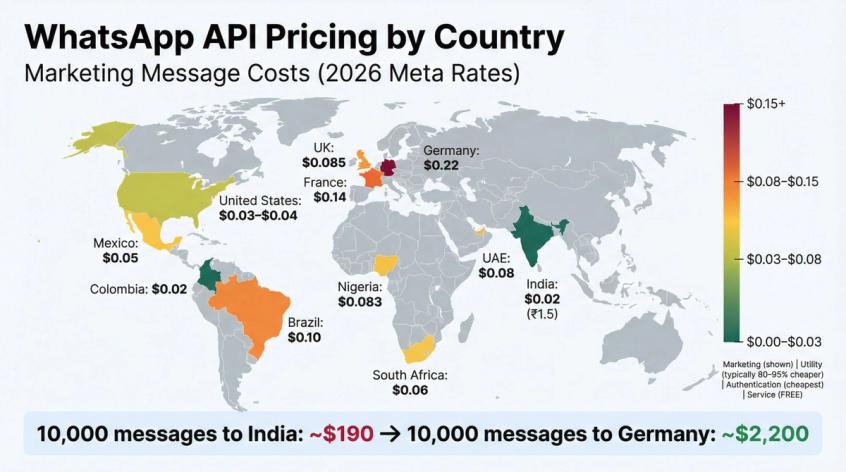
The strategic takeaway: if you're targeting multiple markets, analyze your audience distribution. A 10,000-message campaign to Indian customers costs about $190 in WhatsApp fees. The same campaign to German customers costs $2,200. Understanding your country mix is essential for accurate budgeting.
Also note that Meta adjusts these rates periodically. January 2026 saw some markets lowered (France, Egypt) and others raised (India) to reflect local demand and competition. Always verify current rates when planning campaigns.
What Are the Free Messaging Windows on WhatsApp?
WhatsApp's free messaging windows are probably the most underutilized cost-saving feature in the platform. Let's break down exactly how they work.
The 24-Hour Customer Service Window
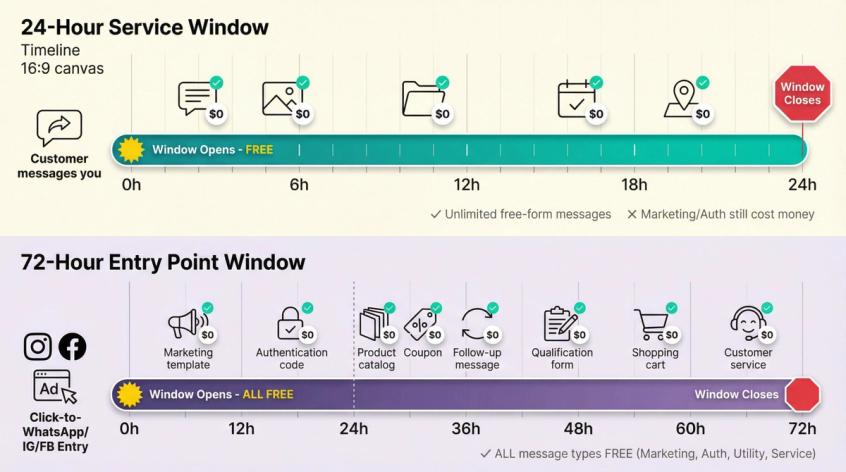
When a user messages your business for any reason (asking a question, saying "hi," replying to one of your messages), it opens a 24-hour window during which you can reply without a template. Since 1 October 2026 the first 1,000 service replies a month per business phone number are free; after that each reply is charged.
What you can send without a template within 24 hours:
• Free-form text messages
• Images, videos, documents, audio
• Interactive buttons and quick replies
What costs money within 24 hours:
• Marketing, utility and authentication templates (charged at the normal rate)
• Service replies after the first 1,000 a month per business phone number (since 1 October 2026)
The timer resets every time the customer sends a message, so an active support conversation can stay open as long as the customer keeps responding within each 24-hour period.
This is huge for customer support operations. You can have entire troubleshooting sessions, onboarding conversations, or sales discussions without any per-message cost. Most businesses running WhatsApp support with AI agents find their message costs are almost entirely from outbound campaigns, not support.
The Free Entry Point Window (Up to 7 Days)
When someone contacts you through a Click-to-WhatsApp ad and you reply within 24 hours, you get a free entry point window of up to 7 days (72 hours before 28 September 2026) where all messages are free, including marketing and authentication templates.
Entry point that opens the window:
① Click-to-WhatsApp ads on Facebook or Instagram
This is an incredibly generous feature. Someone clicks your Click-to-WhatsApp ad on Instagram, lands in a WhatsApp chat with your business, and you have up to seven days to nurture that lead without any message fees. You could send product info, answer questions, share a coupon code, and follow up multiple times, all at zero cost.
Smart businesses build entire lead generation sequences designed to operate within this free window. Run an ad campaign, capture leads on WhatsApp, use an AI agent trained on your knowledge base to qualify them, and convert them before it closes. Your only cost is the ad spend and your platform fee (no per-message charges).
When the free entry point window ends, you're back to standard rules. You'd need to use templates to re-engage, which would incur normal per-message fees.
How Spur Makes WhatsApp API Simple and Cost-Effective
Managing WhatsApp Business API pricing shouldn't require a finance degree, but many businesses struggle with complex billing, hidden markups, and platforms that make cost optimization difficult. That's where Spur's WhatsApp platform comes in.
Transparent, Published Pricing
Unlike providers that bury per-message fees in the fine print, Spur publishes its per-message rate for every country and category and bills messages through a prepaid wallet, so you see the price of a message before you send it. No hidden fees, no surprises.
You pay a monthly platform subscription (plans start at $39/month for the AI Start tier) that includes all the software features, unlimited contacts, and unlimited message volume. WhatsApp message charges are separate and billed at Spur's published per-message rates, from a wallet you top up as needed.
This transparency makes budgeting straightforward. You know your fixed platform cost and you know your exact per-message cost by country and category. No guessing about what your provider is adding on.
Actionable AI That Optimizes Free Windows
Spur doesn't just give you access to WhatsApp API. We built Actionable AI agents that can be trained on your knowledge base and handle the bulk of customer conversations automatically within the 24-hour service window.
Think about it: when a customer messages you with "Where's my order?" our AI agent can check your order system, pull the tracking info, and respond instantly inside the service window, where the first 1,000 replies a month are free. These aren't basic FAQ chatbots. They're agents that can perform actions like checking order status, updating customer records, booking appointments, or triggering workflows in your CRM.
This is a massive differentiator from competitors. Tools like Manychat don't let you train AI on your own knowledge base. Chatbase alternatives don't offer the marketing automation and multi-channel capabilities. Uchat alternatives don't have a built-in knowledge base system. Botpress alternatives are powerful but require technical expertise to set up.
We make it simple: upload your FAQs, product docs, or website content, and the AI learns your business. Then it handles repetitive queries automatically while routing complex issues to your human team. You save on WhatsApp costs (fewer replies per chat keeps more of your volume inside the 1,000 free service messages a month) and save on labor costs (AI handles tier-1 support).
Unified Multi-Channel Inbox
WhatsApp is powerful, but your customers are also on Instagram DMs, Facebook Messenger, and live chat on your website. Spur gives you a single unified inbox for all these channels, with the same AI agents working across all of them.
This matters for cost optimization because you're not paying separate tools for each channel. You're not juggling multiple systems with different pricing models. It's one platform, one bill, one workflow.
Our Instagram automation, for instance, can handle comment-to-DM flows (someone comments on your Instagram post, we automatically DM them) which is incredibly effective for lead generation. Pair that with WhatsApp automation for cart recovery or order updates, and you've got a complete engagement stack.
User-Friendly Setup (No Technical Expertise Required)
One of the biggest hidden costs of WhatsApp API is setup time and technical complexity. Some platforms require developer resources or weeks of configuration. Spur is designed for marketing teams and business owners to set up themselves.
Visual automation builder for creating flows. Pre-built templates for common scenarios (abandoned cart, order updates, welcome sequences). Direct integrations with Shopify, WooCommerce, Stripe, Razorpay, and other platforms you're already using.
You can go from signup to sending your first automated WhatsApp campaign in hours, not weeks. That speed-to-value is a real cost savings when you factor in implementation time.
Real Results from Real Businesses
Businesses using Spur have reported 73-88x ROI on WhatsApp marketing campaigns, 99% delivery rates using our DeliveryBoost features, and significant reductions in support costs by automating routine queries. These aren't hypothetical benefits. They're documented in case studies with actual revenue numbers.
The platform is also built to scale. Whether you're sending 500 messages a month or 500,000, the system handles it. And because every message is billed at a published rate, your costs scale predictably.
Ready to see how much you could save while improving engagement? Try Spur with a 7-day free trial and see the difference transparent pricing and smart automation make.
What Do WhatsApp Business Solution Providers Charge?
Meta's WhatsApp fees are just one part of your total cost. You'll also pay your Business Solution Provider (BSP) or messaging platform, and these provider fees vary widely.
Understanding the full cost structure is critical for accurate budgeting and fair comparisons.
The Two-Part Cost Structure
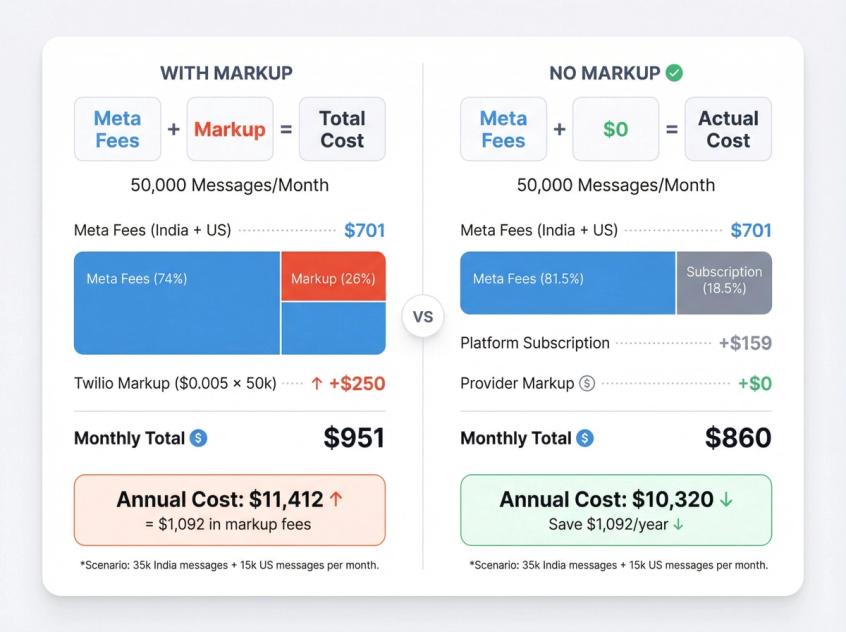
Total WhatsApp API Cost = Meta Fees + Provider Fees
Meta's fees are standardized and the same regardless of which provider you use. A marketing message to the US costs ~$0.035 whether you use Twilio, Spur, WATI, or any other provider.
The difference is what the provider charges for their platform and services.
Provider Pricing Models
Per-Message Markup:
Some providers add a fixed fee to every message. Twilio charges Meta's fee plus $0.005 per message (both outgoing and incoming). So a $0.035 US marketing message becomes $0.04 total. MessageBird has a similar $0.005 markup.
On small volumes this is negligible. On large volumes it adds up fast. If you send 100,000 messages a month, a $0.005 markup costs you an extra $500/month.
Percentage Markup:
Other providers add a percentage on top of Meta's rates. WATI, for example, charges roughly 20% above WhatsApp's fees. If Meta charges $0.02, WATI charges $0.024. Again, this scales with your usage.
Monthly Subscription + Passthrough:
Some providers charge a flat monthly platform fee and pass WhatsApp fees through at cost, so you pay a subscription plus Meta's list rates for every message.
This model is most cost-effective at higher volumes because the markup is zero.
Per-Number Fees:
Some BSPs charge monthly fees per WhatsApp phone number. SleekFlow, for instance, charges $15/month per connected WhatsApp number on top of message fees. If you operate multiple numbers (different countries or departments), this can add up.
Bundled Conversation Packages:
A few providers offer plans with "X conversations included" for a monthly rate, then overages. This was more common under the old conversation-based pricing. It's harder to find now with the per-message model, but some legacy plans still exist.
How to Evaluate Total Cost of Ownership
When comparing WhatsApp API providers, calculate your all-in cost:
① Estimate your monthly message volume by category
② Multiply by the appropriate Meta rate for your audience's countries
③ Add provider markup (if any)
④ Add monthly platform subscription
⑤ Add any per-number or setup fees
For example, let's say you send 50,000 messages/month (70% to India, 30% to US), split evenly between marketing and utility:
With Twilio (per-message markup):
• 35,000 India messages: (17,500 × $0.02) + (17,500 × $0.0025) = $393
• 15,000 US messages: (7,500 × $0.035) + (7,500 × $0.006) = $308
• Twilio markup: 50,000 × $0.005 = $250
• Total: ~$951/month
With a flat-fee provider billing at Meta's list rate:
• 35,000 India messages: $393 (same as above)
• 15,000 US messages: $308 (same as above)
• Platform subscription: $159/month (example)
• Total: ~$860/month
The $91 monthly difference compounds to over $1,000 annually. And this is a modest volume example. At 500,000 messages/month, the savings from zero markup becomes significant.
Beyond pure cost, also evaluate:
→ Feature set (automation, AI, integrations)
→ Support quality and responsiveness
→ Ease of use and setup time
→ Reporting and analytics
→ Multi-channel capabilities (if needed)
The cheapest option isn't always the best, but you should absolutely understand what you're paying for and avoid unnecessary markups.
WhatsApp API Cost Calculator: Real Examples
Let's walk through three common WhatsApp API use cases with complete cost calculations, so you can see exactly what to expect.
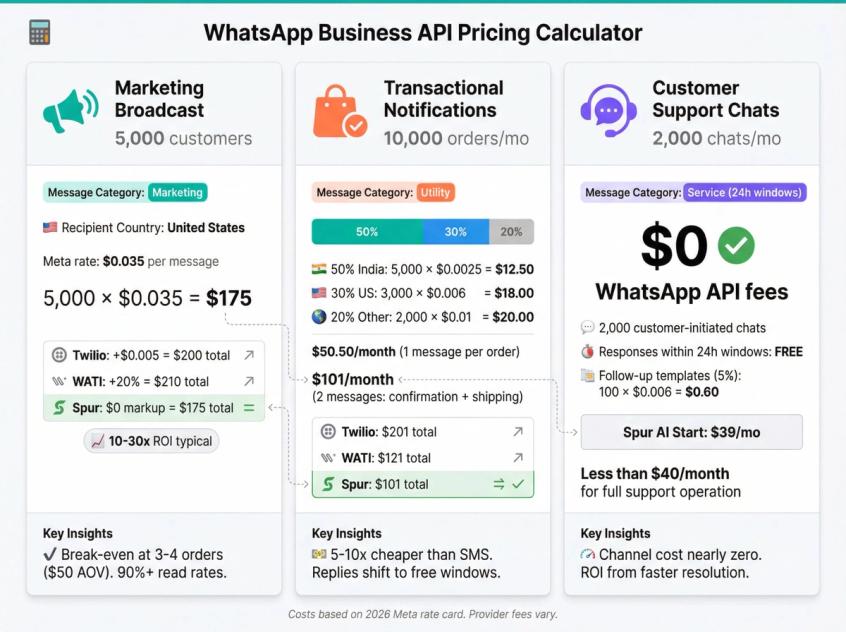
Scenario 1: Marketing Broadcast to 5,000 US Customers
You want to send a promotional campaign announcing a flash sale to your US-based WhatsApp subscriber list of 5,000 people.
Message category: Marketing (it's a promotional announcement)
Recipient country: United States
Meta rate: ~$0.035 per marketing message
WhatsApp API cost: 5,000 messages × $0.035 = $175
Provider fees (examples):
• With Twilio: +$0.005 per message = $25 extra → Total $200
• With WATI: +20% = $35 extra → Total $210
• At Meta's list rate with no added fee: Total $175
Plus your monthly platform subscription, which varies by provider (typically $39-199/month depending on features).
Expected engagement: WhatsApp messages typically see 90%+ read rates within minutes. If even 10% of recipients respond with interest (500 people), that opens 500 24-hour service windows where you can continue the sales conversation without a template, at the service rate after your 1,000 free service messages a month.
If this campaign generates just 3-4 orders averaging $50 each, it's already break-even on the message cost. Most businesses running WhatsApp marketing campaigns see 10-30x ROI because the engagement is so high.
Scenario 2: Transactional Notifications for 10,000 Monthly Orders
You run an e-commerce store and send order confirmation plus shipping update messages via WhatsApp for every order. Let's say 10,000 orders/month with customers distributed globally: 50% India, 30% US, 20% other markets (average $0.01 for simplicity).
Message category: Utility (transactional order updates)
Calculations:
• 5,000 India utility messages × $0.0025 = $12.50
• 3,000 US utility messages × $0.006 = $18
• 2,000 other utility messages × $0.01 = $20
• Total WhatsApp API cost: ~$50.50/month
If you send 2 messages per order (confirmation + shipping), double it to ~$101/month.
Provider markup impact:
• With $0.005 Twilio markup on 20,000 messages: +$100 → Total ~$201
• With 20% WATI markup: +$20 → Total ~$121
• At Meta's list rate with no added fee: Total ~$101
For high-value transactional notifications with 20,000 messages/month, you're looking at $100-200 in WhatsApp fees depending on provider. Compare that to SMS (often $0.05-0.10 per message = $1,000-2,000) and it's dramatically cheaper.
Plus, remember if customers reply to these messages (asking follow-up questions), those conversations move into the 24-hour service window, where your first 1,000 service replies a month are free. You can handle "Where's my order?" queries there using Spur's AI agents.
Scenario 3: Customer Support (2,000 Monthly Chats)
Your support team handles 2,000 incoming WhatsApp inquiries per month. These are all customer-initiated (they message you first).
Message category: Service (customer-initiated, 24h windows)
WhatsApp API cost for these conversations: $0
Since 1 October 2026 Meta charges for service messages after the first 1,000 a month per business phone number, and utility templates inside the window are charged too. Your team can still respond freely with text and images inside the 24-hour window, without needing a template.
Where you might incur costs:
If you send follow-up messages more than 24 hours after the customer's last message, you'd need templates (utility most likely). Let's say 5% of chats (100) require a follow-up template 2-3 days later.
100 US utility templates × $0.006 = $0.60 in WhatsApp fees
Total WhatsApp API cost for 2,000 support chats: Less than $1/month
Your actual costs here are:
• Your platform subscription (Spur's AI Start plan is $39/month)
• Your support team's time (which AI automation can reduce significantly)
This is why WhatsApp is so powerful for customer support. The channel cost is essentially zero. Your ROI comes from improved customer satisfaction, faster resolution times, and reduced support labor through automation.
How to Reduce WhatsApp API Costs
Once you understand the pricing model, you can deliberately reduce costs without sacrificing results. Here's how.
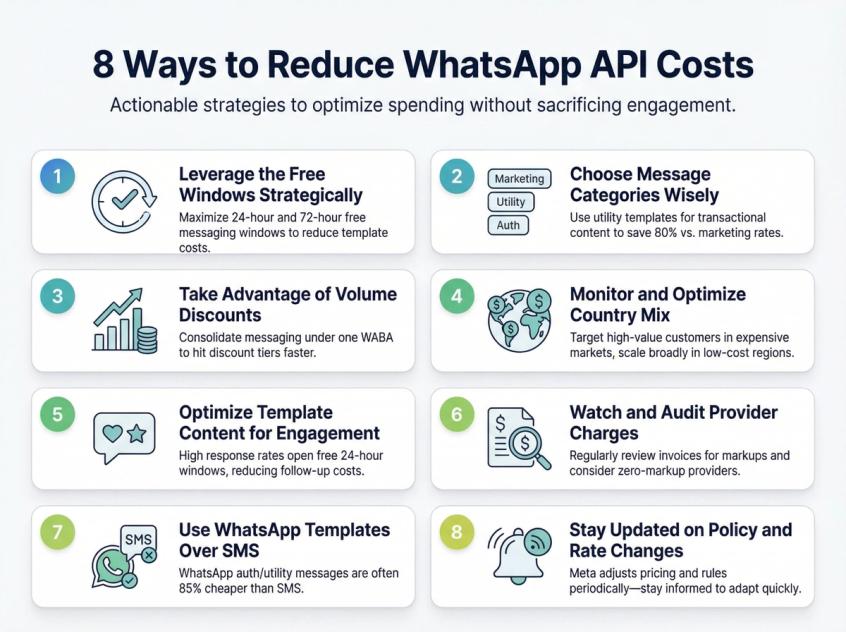
1. Leverage the Free Windows Strategically
Design your messaging flows to maximize time in free windows. When someone messages you, handle as much as possible within 24 hours before sending additional templates. For Click-to-WhatsApp ad leads, build a nurture sequence with automation that fits inside the free window (up to 7 days) and converts while messaging is free.
2. Choose Message Categories Wisely
Always use the appropriate category for your templates. Don't stuff promotional content into utility templates (it'll get rejected and you'll waste time). Conversely, don't accidentally categorize transactional messages as marketing (you'll pay 3-5x more than necessary).
If you're sending something that could reasonably be utility or marketing, lean toward utility if it ties to a transaction. "Your order shipped" is utility. "Your order shipped, and here are more products you might like" is marketing.
3. Take Advantage of Volume Discounts (If Applicable)
If you send very high volumes of utility or authentication messages (think hundreds of thousands monthly), you'll automatically hit volume discount tiers. Meta reduces incremental message costs beyond certain thresholds.
These discounts apply per WhatsApp Business Account (WABA), so consolidating all your messaging under one WABA maximizes savings. Fragmenting across multiple providers or accounts can prevent you from reaching the tier thresholds.
4. Monitor and Optimize Country Mix
Track how your messages distribute across countries. If you're spending heavily on expensive markets (Western Europe, some parts of APAC), consider:
→ Segmenting campaigns to prioritize high-value customers in those regions
→ Focusing mass promotional sends on lower-cost regions
→ Using other channels (email, SMS) for certain markets where WhatsApp is pricier
Conversely, in markets where WhatsApp is very cheap (India, Colombia, parts of LatAm), you can afford to be more aggressive with messaging frequency.
5. Optimize Template Content for Engagement
Every delivered message costs money, so make it count. Use personalization, clear value propositions, and compelling CTAs to increase response rates.
When users respond, you enter 24-hour service windows where you can reply without a template, and the first 1,000 service replies a month are free. A well-crafted message that prompts 30% of recipients to reply keeps those conversations going at the service rate for the next day. That's dramatically more cost-effective than a generic blast where nobody responds and you need to send follow-up templates days later.
6. Watch and Audit Provider Charges
If you're on a BSP with per-message markups, regularly audit your invoices. Make sure you're being charged correctly and that the markup aligns with what you agreed to.
If you scale significantly, consider switching providers. The difference between zero markup and 20% markup on 500,000 messages monthly is thousands of dollars annually.
7. Use WhatsApp Templates Over SMS When Logical
For authentication and utility messages, WhatsApp is often cheaper and more reliable than SMS. A US OTP via SMS might cost $0.04, while WhatsApp auth is $0.006. That's 85% cheaper.
In markets with high SMS costs or low delivery rates, shifting appropriate messaging to WhatsApp can reduce costs while improving the user experience (rich media, better formatting, interactive elements).
8. Stay Updated on Policy and Rate Changes
WhatsApp occasionally adjusts pricing, introduces new message categories, or changes rules around free windows. Following Spur's blog or WhatsApp's official announcements keeps you ahead of changes that could affect your costs or strategy.
For example, the shift from conversation pricing to per-message in 2025 was significant. On 28 September 2026 Meta extended the free window for ad leads from 72 hours to up to 7 days. Being aware of these updates as they happen lets you adapt quickly.
Is WhatsApp Business API Worth the Cost?
When you first calculate WhatsApp API costs, paying even a few cents per message can seem expensive compared to "free" email. But that comparison misses the point entirely.
The Engagement Equation
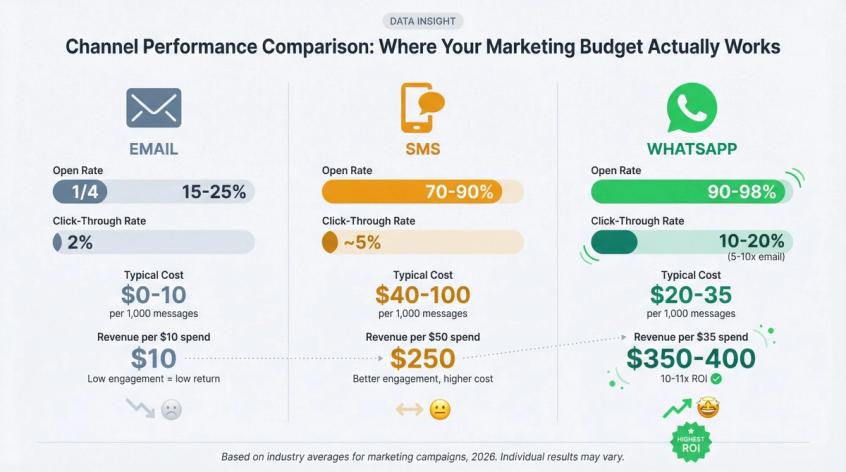
WhatsApp messages get read. Email marketing averages 15-25% open rates on a good day, and that's declining. SMS marketing is better (70-90%) but still doesn't match WhatsApp's 90-98% open rate within minutes.
People treat WhatsApp like a personal communication channel. When your business message appears next to messages from their friends and family, it gets attention. The psychological framing is completely different from "another promotional email in my spam folder."
This engagement translates directly to business results. Businesses report 5-10x higher click-through rates on WhatsApp versus email. Conversion rates on WhatsApp campaigns often hit double digits. The ROI per message sent is substantially higher, which justifies the cost.
The Math of Return
Let's say you send 1,000 marketing messages to US customers at $0.035 each = $35 in WhatsApp fees.
If 15% of recipients click through (150 people) and 5% of those convert (7-8 sales) with an average order value of $50, you've generated $350-400 in revenue from a $35 message spend. That's 10-11x ROI before even considering lifetime value.
Email would cost less to send (maybe $0-10 depending on your tool), but typical results might be 2% click-through and 1% conversion = 0.2 sales = $10 revenue. WhatsApp wins on absolute return, not just percentage.
When It Makes Sense
WhatsApp Business API makes the most sense when:
• Your customers are on WhatsApp (check regional adoption rates)
• You value high engagement and fast response times
• You're sending transactional messages (order updates, OTPs) where costs are minimal
• You want to build conversational relationships, not just broadcast
• You can use automation to handle inbound at scale (using tools like Spur)
It's less ideal when:
• Your audience isn't on WhatsApp (older demographics in some regions, B2B contexts where email is dominant)
• You're sending very high volume one-way blasts with no expectation of response
• Budget is extremely constrained and email/SMS incumbents already work well
The Automation Multiplier
The real value of WhatsApp API emerges when you combine it with smart automation. A platform like Spur lets you:
→ Auto-respond to FAQs (inside the service window, where the first 1,000 replies a month are free)
→ Send triggered messages based on user behavior (abandoned cart, browsing alerts)
→ Route complex issues to humans while AI handles tier-1 support
→ Run multi-step nurture sequences through the free ad windows (up to 7 days)
When automation is handling 60-80% of conversations in free windows, your net WhatsApp costs drop dramatically while customer satisfaction and conversion rates go up. The channel becomes more efficient, not more expensive.
Start Using WhatsApp API the Smart Way
WhatsApp Business API pricing doesn't have to be confusing. The fundamental model is straightforward: pay per template message delivered, with costs determined by category and country. Customer support is cheap, with the first 1,000 service replies a month free on each business phone number. Strategic use of the 24-hour and free entry point windows can dramatically reduce your total spend.
The channel itself is incredibly valuable. 90%+ read rates, high engagement, and the ability to have real conversations with customers make WhatsApp one of the highest-ROI marketing automation platforms and support channels available today.
The key is choosing the right platform to execute on WhatsApp. Hidden markups, complex billing, and lack of automation can turn a cost-effective channel into an expensive headache. Transparent pricing, smart AI automation, and multi-channel marketing capabilities done right (like Spur offers) turn WhatsApp into a conversion and efficiency engine for your business.
Ready to see what WhatsApp API can do for your business without hidden fees or pricing mysteries? Try Spur free for 7 days and experience transparent pricing, actionable AI, and multi-channel engagement that actually works.
Your customers are already on WhatsApp. Meet them there with the right tools and the right pricing.
WhatsApp API Pricing FAQ
It depends on the message category and recipient's country. Marketing messages range from ~$0.02 (India) to $0.22 (Germany). Utility, authentication and service messages are typically 50-95% cheaper, often under $0.01. Customer service messages within 24-hour windows are free for the first 1,000 a month per business phone number, then charged at the service rate (since 1 October 2026).
The old model (pre-July 2025) charged per 24-hour "conversation" regardless of message volume within that window. The current model charges per individual template message delivered. This makes costs more granular and easier to predict, though it can be more expensive if you send many templates to the same person in a short period.
Messages are free in these situations:
• All messages from customers to you (unlimited, always free)
• Your replies within 24 hours of a customer messaging you
• Utility templates sent within active 24-hour service windows
• All messages (even marketing/auth) within up to 7 days of a Click-to-WhatsApp ad entry
When a user messages your business, it opens a 24-hour window during which you can respond with free-form messages without a template. The window resets every time the user sends another message. Since 1 October 2026, service replies are free only for the first 1,000 a month per business phone number, and marketing, utility and authentication templates are charged even within this window.
When someone contacts you through a Click-to-WhatsApp ad and you reply within 24 hours, you get up to 7 days of completely free messaging (all categories). This is designed to encourage businesses to use WhatsApp ads and gives you up to seven days to nurture new leads at zero message cost.
① Estimate message volume by category (marketing, utility, auth)
② Determine your audience's country distribution
③ Multiply volume by the appropriate Meta rate for each category + country combination
④ Add your provider's markup (if any)
⑤ Add monthly platform subscription
For example: 10,000 marketing messages to India = 10,000 × $0.02 = $200 in WhatsApp fees, plus your provider's fees. Use Spur's WhatsApp Pricing Calculator for precise estimates.
Marketing: Promotional messages (sales, product recommendations, newsletters). Most expensive category.
Utility: Transactional updates tied to user actions (order confirmations, shipping updates, appointment reminders). Mid-range pricing.
Authentication: OTPs, verification codes, login flows. Cheapest category.
Each serves a different purpose and must be categorized correctly for approval.
No. All messages from customers to your business are 100% free with no volume cap. You only pay for template messages you initiate outside of free windows.
Lowest: Colombia (marketing ~$0.02, utility ~$0.001), India (marketing ~$0.02), several LatAm and African markets have sub-$0.05 marketing rates.
Highest: Western Europe (Germany $0.22, France ~$0.14 for marketing), some Asia-Pacific regions ($0.12).
Utility and auth messages are cheap everywhere, typically under $0.01.
A BSP is an approved partner that gives you access to WhatsApp Business API. Meta doesn't offer direct access for most businesses. Instead, you use a BSP like Spur, Twilio, WATI, MessageBird, or others. They provide the software platform, features, and support, while Meta handles message delivery.
Many do. Twilio adds $0.005 per message. WATI adds ~20%. Some charge monthly fees per phone number. Spur bills messages through a prepaid wallet at published per-country rates, so you can see every message price before you send, plus a monthly platform subscription.
Always check the BSP's pricing structure to understand total cost of ownership.
It depends on your needs:
For published, predictable pricing, automation features, and AI capabilities: Spur offers published per-message rates, multi-channel inbox, actionable AI agents trained on your knowledge base, and user-friendly setup.
For pure pay-as-you-go simplicity if you're technical: Twilio or MessageBird provide straightforward API access with good documentation, though they add per-message fees.
For SMB-focused packages with support: WATI and similar providers offer hands-on help, though markups can be higher.
Compare total cost (platform + message fees), features (automation, AI, integrations), ease of use, and support quality.
Yes, but you must follow rules:
• Messages must use approved marketing templates
• Users must have opted in to receive messages
• You can typically only send one marketing template per 24 hours to the same user
• Some countries have additional restrictions
WhatsApp is highly effective for permission-based marketing automation (abandoned cart, product launches to subscribers, special offers to engaged customers). It's not for cold outreach or spam.
For transactional and auth messages, almost always yes. WhatsApp OTP codes often cost under $0.01, while SMS can be $0.04-0.10. WhatsApp utility messages in most countries are $0.001-0.01, cheaper than SMS equivalents.
For marketing, it varies. In some regions SMS is cheaper per message, but WhatsApp's significantly higher engagement often delivers better ROI per dollar spent.
Also consider that WhatsApp supports rich media (images, videos, buttons) which SMS doesn't, adding value beyond just cost.
Meta offers incremental discounts on utility and authentication messages once you pass certain monthly volume thresholds. For example, after 100,000 messages in a category/country, additional messages might get 5% off, then 10% off at the next tier.
Discounts are automatic, apply per WhatsApp Business Account, and reset monthly. Marketing messages don't currently have volume discounts. Heavy senders of OTPs and transactional messages benefit most.
Yes. WhatsApp numbers can be migrated between BSPs, though the process requires coordination. You'll need to work with both the old and new provider to transfer the number registration. Plan for some downtime and test thoroughly before fully switching.
Spur can help with migration if you're switching to our platform.
The general process:
① Choose a BSP (like Spur)
② Sign up and register your business
③ Verify your WhatsApp phone number using a WhatsApp link generator
④ Submit business verification documents to Meta
⑤ Create and get approval for message templates
⑥ Connect integrations (Shopify, CRM, etc.)
⑦ Build automation flows or chatbots
⑧ Launch campaigns or enable support
With Spur, this typically takes hours to days. We guide you through each step and provide templates to speed things up.
WhatsApp Business App: Free mobile app for small businesses. Suitable for single-person use, manual messaging, basic features. Limited to one device, low volume. No automation.
WhatsApp Business API: Enterprise solution for scaled messaging. Supports automation, chatbots for ecommerce, multiple agents, integrations with business systems, and unlimited volume. Requires a BSP (costs money). Designed for businesses sending hundreds to millions of messages.
If you're sending bulk messages, running campaigns, or need automation, you need the API, not the app.
Was this article useful?